ScreenReel
REC

Screen recordings
that polish themselves.

Turn your screen recordings into dynamic demos, with zooms and a camera that follows your cursor and text… oh, and no typos!

Coming soon to MacWatch it work

Free · macOS 15 Sequoia or later · Windows coming soon

You hit record.

Real export · scroll to play

What happens after you hit stop.

New
Auto zoom

Zooms in a beat before you click.

Every click becomes a smooth zoom, timed like an editor would cut it.

Auto zoom

Zooms in a beat before you click.

Every click becomes a smooth zoom, timed like an editor would cut it.

New

0.3 s early

The zoom starts just before your click.

Lazy follow

Holds still, glides only when you near the edge.

All editable

Each zoom is a block on the timeline.

Open the full page

New project

Name

Description

What is it about?
CancelCreate project
Text tracking

You type. The camera follows.1

The camera follows your caret, so every line you type stays big and readable, even in VS Code and the terminal.

Text tracking

You type. The camera follows.1

The camera follows your caret, so every line you type stays big and readable, even in VS Code and the terminal.

Coding tutorials your viewers can actually follow, line by line.

Real export · VS Code

Any app

Finds the caret, even in terminals.

Stays put

Bumping the mouse won't pull it away.

Sped up

Long typing plays faster, your voice doesn't.

Open the full page

What you typed

In your video

2×

Typed in 3.7 s · plays in 0.9 s

No typos

Type sloppy. The typos never make the cut.

You don’t need 100% typing accuracy: typos and their backspaces are cut from the video.

No typos

Type sloppy. The typos never make the cut.

You don’t need 100% typing accuracy: typos and their backspaces are cut from the video.

What you typed

In your video

2×

Typed in 3.7 s · plays in 0.9 s

Cut, not hidden

Real footage, minus the mistakes.

On by default

Off per section when you want it.

Private

It never records which key you press.

Open the full page
Cursor

Your cursor, minus the shaky hand.

Your cursor is redrawn, never recorded: bigger, smoother, sharp at any zoom.

Cursor

Your cursor, minus the shaky hand.

Your cursor is redrawn, never recorded: bigger, smoother, sharp at any zoom.

Smoothed

Hand wobble, gone.

Visible clicks

A press animation on every click.

Vector sharp

Crisp even at 3× in 4K.

Open the full page
Real export · 0.6× speed
Motion blur

Want your recording to feel like a movie? Add motion blur. Or don’t.1

Cursor and camera moves get real motion blur, like a film camera’s shutter. Prefer it crisp? Turn it off.

Motion blur

Want your recording to feel like a movie? Add motion blur. Or don’t.1

Cursor and camera moves get real motion blur, like a film camera’s shutter. Prefer it crisp? Turn it off.

Real export · 0.6× speed

Your call

On for a film look, off for a crisp one.

Only what moves

Still text stays razor sharp.

24, 30 or 60 fps

Blur made for the rate you export.

Open the full page

Hi, I'm Sam from Northwind.

Let me show you how fast

it is to start a project.

Click New project,

give it a name,

and that's it.

Hi, I'm Sam from Northwind.

Let me show you how fast

it is to start a project.

Click New project,

give it a name,

and that's it.

Teleprompter

A script only you can see.1

Your script scrolls under the camera, invisible to the recording.

Teleprompter

A script only you can see.1

Your script scrolls under the camera, invisible to the recording.

Hi, I'm Sam from Northwind.

Let me show you how fast

it is to start a project.

Click New project,

give it a name,

and that's it.

Hi, I'm Sam from Northwind.

Let me show you how fast

it is to start a project.

Click New project,

give it a name,

and that's it.

Invisible

Never captured, clicks included.

⌃⌥P

Play, pause, skip, speed: from any app.

Eye contact

Sits right under the camera.

Open the full page
Export16:9 · 9:16 · 1:1

16:9 for your site, 9:16 for the feed.1

One recording, exported for every place it goes, up to 4K.

Customize even more after the recording.

Everything ScreenReel did is a block on the timeline. Keep it, tweak it, or change it completely.
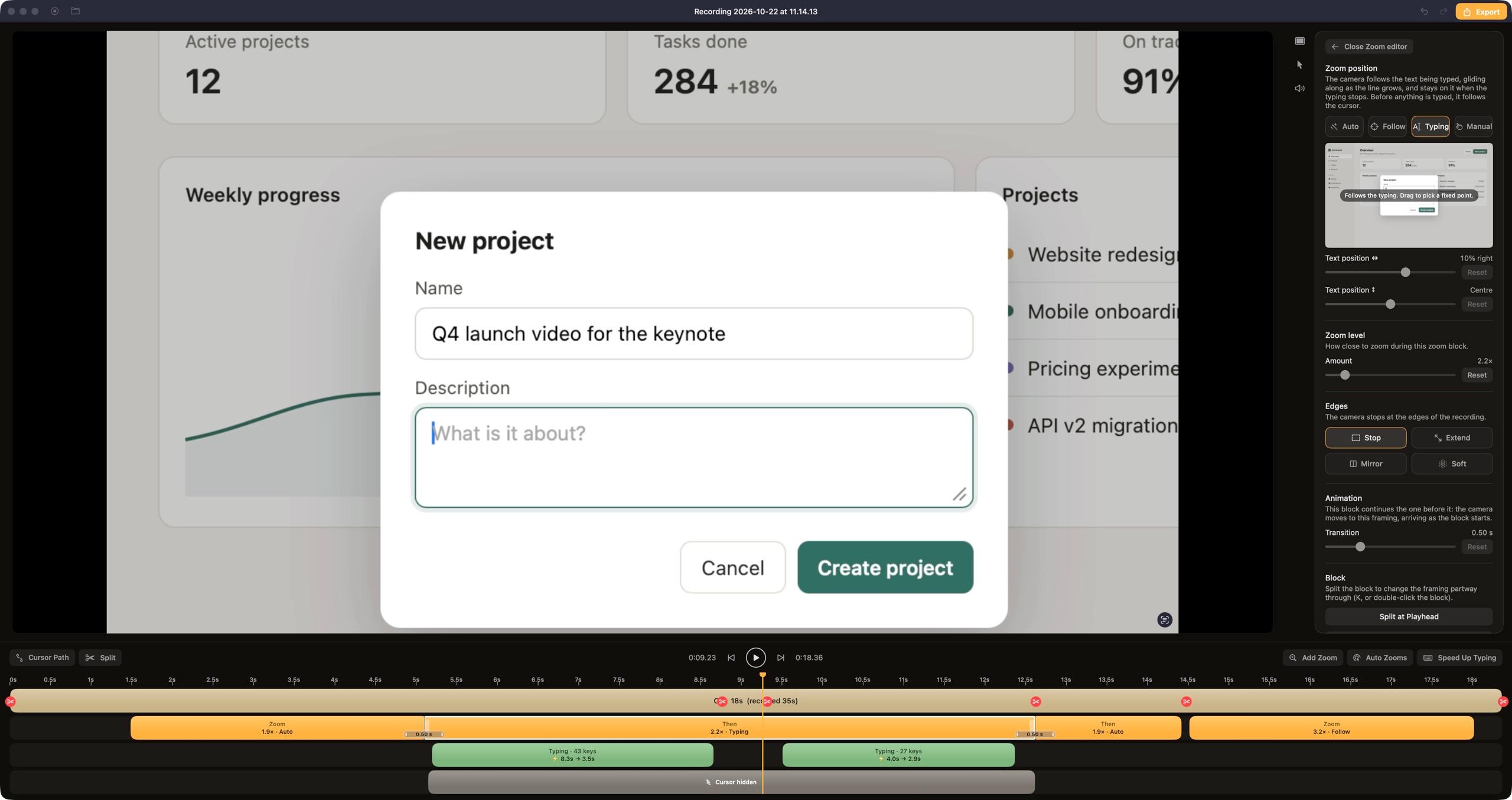
The ScreenReel editor: the preview of the demo, the timeline with zoom, typing and cursor blocks, and the settings panel

The edit, already done.

Everything ScreenReel did to the take in the film above. Each line is a block on the timeline you can move, change or delete.

Edit log · demo film36.0 s take → 18.4 s video
  1. 00:01.5ZoomIn on “New project”
  2. 00:04.1ZoomOver to the Name field
  3. 00:05.1TypingCamera follows the caret
  4. 00:05.1SpeedName typed 2× faster
  5. 00:08.6CutA typo and its backspaces
  6. 00:08.6CutDead air before Description
  7. 00:09.5SpeedDescription typed faster
  8. 00:12.6ZoomGlide to “Create project”
  9. 00:14.4ZoomPull back
  10. 00:14.5FollowLock onto the cursor for Launch
  11. 00:17.5ZoomEase out

Free to start. Pro when it ships.

Free

$0/mo

  • Auto zoom
  • Smooth cursor
  • No typos
  • Watermark

Pro

$6.99/mo

  • Everything in Free
  • Text tracking, motion blur
  • Teleprompter, webcam, 4K
  • No watermark

Press record.

Coming soon to MacSee pricing

Free · macOS 15 Sequoia or later · Windows coming soon